

This article is the follow up to my previous write up sharing potential pitfalls of iterators and materialized collections, but I'll admit it... When I initially set out to go write this post on iterator benchmarks and contrast them with materialized collections, I was quite confident about what I'd find. In fact, I was so confident in what I'd expect that I coded up all of the sample code and thought I'd record a video on the results as soon as they hit the console output. I pressed the record button, brought up the console window, and realized I couldn't explain half of what I was seeing.
Realistically, this was a way more interesting outcome for me. Putting together an analysis can be boring if you know what to expect every step of the way. The results were only half what I expected, and the remainder was truly a big shock for me when investigating these iterator benchmarks.
Companion Video!

Benchmark Setup
We're of course going to be using BenchmarkDotNet for our benchmarks, and you can find all of the code for these over at GitHub. To start, we need an entry point hook for our single Benchmark class that will be defining the permutations of scenarios that we'd like to run. This will be relatively basic as follows:
var config = ManualConfig
    .Create(DefaultConfig.Instance)
    .WithOptions(ConfigOptions.DisableOptimizationsValidator);

var summary = BenchmarkRunner.Run(
    typeof(Benchmarks),
    config);

if (!summary.BenchmarksCases.Any())
{
    throw new InvalidOperationException("Benchmarks did not have results.");
}
Next will be the portion of the Benchmarks class that actually defines the permutations we'd like to have our scenarios run against:
[Orderer(BenchmarkDotNet.Order.SummaryOrderPolicy.Method)]
[ShortRunJob(RuntimeMoniker.Net70)]
[MemoryDiagnoser]
public class Benchmarks
{
    public enum ImplementationScenario
    {
        Iterator,
        PopulateAsList,
        PopulateAsROCollection
    }

    private int[] _dataset;

    [Params(
        1_000,
        100_000,
        10_000_000)]
    public int NumberOfEntriesInDataset;

    [Params(
        ImplementationScenario.Iterator,
        ImplementationScenario.PopulateAsList,
        ImplementationScenario.PopulateAsROCollection)]
    public ImplementationScenario Implementation;

    [GlobalSetup]
    public void Setup()
    {
        // seed this for consistency
        var random = new Random(1337);
        _dataset = new int[NumberOfEntriesInDataset];
        for (int i = 0; i < _dataset.Length; i++)
        {
            _dataset[i] = random.Next();
        }
    }

  // TODO: all the benchmark methods go here
}
The code above will setup a source array for us to work with that will have 1,000, 100,000, or 10,000,000 random integers depending on the benchmark run. We use a seeded Random for our benchmarks, but the scenarios we're going to be looking at shouldn't actually be concerned with the values of the integers. Next, we have one of three scenarios that will be selected to exercise and we can see that code as follows:
    private IEnumerable<int> GetResultsUsingIterator()
    {
        foreach (var item in _dataset)
        {
            yield return item;
        }
    }

    private List<int> GetResultsUsingListAsList()
    {
        var results = new List<int>();
        foreach (var item in _dataset)
        {
            results.Add(item);
        }

        return results;
    }

    private IReadOnlyCollection<int> GetResultsUsingListAsReadOnlyCollection()
    {
        var results = new List<int>();
        foreach (var item in _dataset)
        {
            results.Add(item);
        }

        return results;
    }
The first two methods show an iterator and a materialized collection variant. The third method is also a materialized collection, but we've used an IReadOnlyCollection<T> and we'll come back to this as we dive into the examples. A hint is that I wanted to help make sense of what I was observing in the results of iterator benchmarks!
LINQ Any() Results are as Expected!
I'll start us off with one of the iterator benchmarks that I was expecting, and that will be calling Any() on the result of our functions that are being tested. This Benchmark code is as follows (and can be found here on GitHub):
    [Benchmark]
    public void LinqAny()
    {
        _ = Implementation switch
        {
            ImplementationScenario.Iterator => GetResultsUsingIterator().Any(),
            ImplementationScenario.PopulateAsList => GetResultsUsingListAsList().Any(),
            ImplementationScenario.PopulateAsROCollection => GetResultsUsingListAsReadOnlyCollection().Any(),
            _ => throw new NotImplementedException(Implementation.ToString()),
        };
    }
My expectation is that the iterator would be both faster AND use less memory than the materialized collection variant. This is because the call to Any() only needs the iterator to indicate that there is in fact at least one item and because iterators are streaming, there's no allocation of results in a new collection. Conversely, we'd expect that the materialized collections are forced to fully enumerate before they return. This means that we get an entire copy of the dataset, blowing up our memory usage, and we pay the performance hit of full enumeration.
The results below demonstrate this when we look at the Mean and the Allocated columns.

LINQ Count() Results Start to Look Interesting...
The LINQ Count() method is where I started to get caught off guard. The Benchmark method for this is very much like the one we previously looked at, but we use Count() instead of Any():
    [Benchmark]
    public void LinqCount()
    {
        _ = Implementation switch
        {
            ImplementationScenario.Iterator => GetResultsUsingIterator().Count(),
            ImplementationScenario.PopulateAsList => GetResultsUsingListAsList().Count(),
            ImplementationScenario.PopulateAsROCollection => GetResultsUsingListAsReadOnlyCollection().Count(),
            _ => throw new NotImplementedException(Implementation.ToString()),
        };
    }
What I had hypothesized was that we'd observe a similar low memory allocation from the iterator because there was no extra materialization of a secondary collection. This checks out in the results below:

But what I found very peculiar was that the runtime performance for the iterator was not significantly faster than the materialized collections. In fact, it was sometimes slower if not roughly the same. Foolishly, I did forget that the Count() method from LINQ has an optimization that if you have a collection, it can check the count/length of it as a shortcut and not force enumeration. So while that would cut down runtime for materialized collections, shouldn't the overhead of allocating that whole additional collection still incur some type of additional cost?
The results weren't totally obvious here, but they start to get more interesting as we continue looking at the remaining iterator benchmarks!
Comparing Collection vs Iterator Benchmarks for Foreach
The code for this Benchmark is as follows:
    [Benchmark]
    public void Foreach()
    {
        switch (Implementation)
        {
            case ImplementationScenario.Iterator:
                foreach (var x in GetResultsUsingIterator())
                {
                }
                break;
            case ImplementationScenario.PopulateAsList:
                foreach (var x in GetResultsUsingListAsList())
                {
                }
                break;
            case ImplementationScenario.PopulateAsROCollection:
                foreach (var x in GetResultsUsingListAsReadOnlyCollection())
                {
                }
                break;
            default:
                throw new NotImplementedException(Implementation.ToString());
        }
    }
And if you're wondering why I only went with a foreach instead of a traditional for loop with a counter, it's because IEnumerable and therefore iterators do not have this ability. I wanted to keep the comparisons equivalent.
Let's dive into the results of the benchmarks:

When we look at the results of our Benchmark output for foreach, the memory allocation in the Allocated column is on point with what I would expect to see. When we consider an iterator compared to materializing a whole collection, the iterator does not need to allocate an entire extra collection as it streams data.
However, the runtime performance under the Mean column is where I started to get really confused. And I should add, initially I did not have the third variation that has an IReadOnlyCollection<T> return type, so this was added in afterwards to help with my analysis.
Given that iterators are able to stream results, the foreach loop would result in one full enumeration over the dataset. However, materialized collections in this case (unlike LINQ Count() that we saw earlier) absolutely need to do a second full enumeration. The first is for creating the materialized collection and the second is for enumerating over it. How is it that the List<T> return type could be faster than the iterator in every single one of these scenarios? And the other brain teaser (that might give you the answer if you're brushed up on your dotnet versions) is why is the IReadOnlyCollection<T> return type so much slower when the return type is the only difference?
The 'Aha!' Moment
Things weren't adding up for me. I was sitting at my computer with a dumb look on my face, turning off my OBS recording because I just didn't expect to see the performance metrics on some of these scenarios.
I recalled that recently we were very fortunate to get a wealth of performance improvements in .NET 7, and one of the things that stuck out to me was faster processing of arrays and lists. That article describes ReadOnlySpan fast paths for particular LINQ operations, not a blanket conversion of ordinary List<T> foreach loops to spans. The .NET 7 List<T> source exposes a struct enumerator for concrete-list enumeration and interface-based enumeration when accessed through an interface.
So this was my first hunch about why my performance data was unexpected! At this point, I had introduced the third variant you see in all of the iterator benchmarks output, which is the method that has an IReadOnlyCollection<T> return type. My hypothesis was that concrete-list versus interface-based enumeration could help explain the difference. The exact JIT/generated-code cause was not verified by these timing measurements, and I am not treating spans as the established explanation.
When we reflect on the previous data for foreach, we can certainly see that the runtime performance of the IReadOnlyCollection<T> implementation tanks compared to the List<T> and the iterator solutions. These historical measurements show a difference, but do not establish which runtime optimizations caused it.
ToArray Variations Help Explain Iterator Benchmarks Observations
The final scenario that we'll look at together is the LINQ ToArray() method. The code for this benchmark is on GitHub, and is as follows:
    [Benchmark]
    public void LinqToArray()
    {
        _ = Implementation switch
        {
            ImplementationScenario.Iterator => GetResultsUsingIterator().ToArray(),
            ImplementationScenario.PopulateAsList => GetResultsUsingListAsList().ToArray(),
            ImplementationScenario.PopulateAsROCollection => GetResultsUsingListAsReadOnlyCollection().ToArray(),
            _ => throw new NotImplementedException(Implementation.ToString()),
        };
    }

    [Benchmark]
    public void LinqTakeHalfToArray()
    {
        _ = Implementation switch
        {
            ImplementationScenario.Iterator => GetResultsUsingIterator().Take(_dataset.Length / 2).ToArray(),
            ImplementationScenario.PopulateAsList => GetResultsUsingListAsList().Take(_dataset.Length / 2).ToArray(),
            ImplementationScenario.PopulateAsROCollection => GetResultsUsingListAsReadOnlyCollection().Take(_dataset.Length / 2).ToArray(),
            _ => throw new NotImplementedException(Implementation.ToString()),
        };
    }
You'll notice that I also included an additional flavor of this, which is where we attempt to take half of the results of the method using LINQ Take(), and then calling ToArray() on that result. To be clear, adding Take() changes the consumption pipeline and the trade-off being measured here, but returning a LINQ iterator does not by itself imply losing every optimization available for the materialized source. However, I wanted to provide an example of code that is similar to things you might find in production code where people are using LINQ on data sets.
Let's check out the results below:
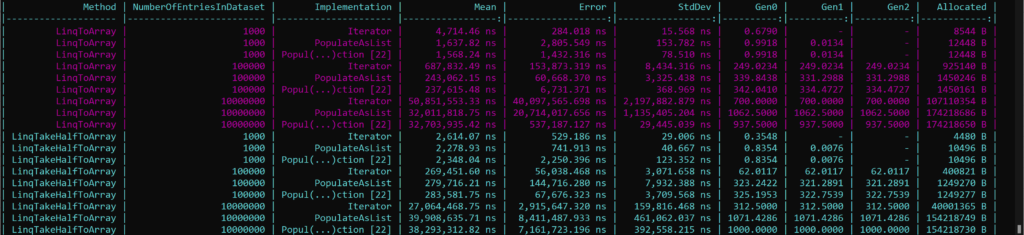
As we've seen with all of the examples so far, iterators remain the champion for memory allocation. Again, this is because they do not need to materialize an entire collection before returning and being used. Conversely, both the other methods have this extra allocation overhead.
The performance characteristics of this seemed shocking to me once more. Why was IReadOnlyCollection<T> also beating out the iterator in these historical results? My hypothesis was that known counts and copying or buffering strategies contributed, but these timings alone do not verify spans, resizing, or the exact implementation path. A hand-written yield iterator does not expose a count through IEnumerable; that does not mean every LINQ iterator or runtime must discover its count by full enumeration, as current Count implementations demonstrate.
What about the Take-Half example?
Well to me this highlights something quite interesting: If you design your code such that it's optimized for performance by using materialized collections, if the caller of your code/API inevitably ends up using LINQ on it this could undermine a lot of what you were trying to achieve in the first place.
Aside from the small dataset scenario, the iterator approach outperforms the other two across the board. Significantly less memory ends up getting used and it ends up being more performant. In these published Take-half cases, the trade-off changes. LINQ does not universally discard collection-specific optimizations: behavior depends on the method, source type, and runtime; for example, Count can use a known collection count or an internal iterator fast path.
So does that mean iterators are awful? Are materialized collections the best? Which should we use?
Summary of Collection vs Iterator Benchmarks
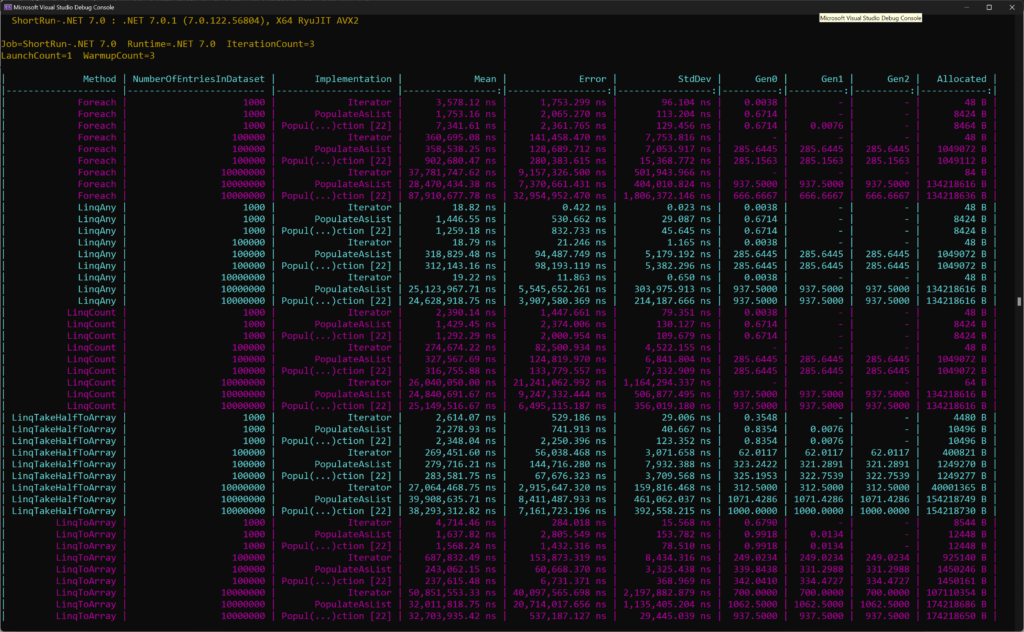
To summarize, let's get a view of all of our collections and iterator benchmarks into one view:
My takeaways:
- In every published .NET 7 benchmark scenario here, iterators allowed us to allocate significantly less memory than these materialized collection approaches. These are historical observations, not verified results for current .NET. If memory is a concern, does that mean you need to use an iterator? Well it might help, but you could also write your code such that those materialized collections are never very large (i.e. write database queries that page smaller segments of data). So you have some options.
List<T>performs well in these published cases. Ordinary foreach over a statically typed List<T> uses its struct enumerator, not an automatic span rewrite; operations like ToArray() can benefit from a known count. The precise performance cause remains unverified without generated-code analysis.IReadOnlyCollection<T>does not seem to be as performance asList<T>but knowing the count of a collection can be helpful for optimizations.
Personally, I may be going back to some of my data-fetching API designs and seeing if I can come up with a more balanced pattern. I really enjoy using the streaming API that is associated with iterators, but there may be performance left on the table that I could squeeze out.
Maybe the Frozen collection types coming in .NET 8.0 will have interesting properties!